Weather Watch-Live Forecast
- 4.3
- Rating
- 50.00K
- Installs
- Free
- Price
 Analysis by App-foxy
I have used Weather Watch-Live Forecast as a straightforward weather companion rather than as a full planning system, and that distinction matters. It is a free weather app from MacroSmart Tech, aimed at people who want current conditions and a forecast available without digging through a crowded news or search app. Its store summary, “Your Weather, Your Way—Now at Hand,” points to that simple idea: keep weather information close enough to check whenever the day changes.
My first impression was that the app makes the most sense when treated as part of a repeatable routine. I check the forecast before leaving home, look again before an afternoon errand, and use it once more when the evening plan depends on outdoor conditions. That sounds basic, but a weather app becomes useful through this kind of habit. Weather Watch-Live Forecast is not something I would install for entertainment or deep meteorological research. I would choose it for quick access, a familiar place to check, and a less distracting experience than opening a general-purpose search page.
The app sits in the weather category and is suitable for Everyone. It is available at no upfront cost, although in-app purchases range from $2.49 to $19.99 per item. That makes it easy to try, but I would still pay attention to which parts of the experience are included before deciding whether any optional purchase is worthwhile. The current version is 1.7.2, and it runs on Android 7.0 or later, so compatibility should cover many older phones as well as newer devices.
You May Also Like

 Pandora - Music & Podcasts
Pandora’s Music Is Easy to Start, but Harder to Recover
Pandora’s strength is its low-effort path from a seed to a station. Its weak spot is how much confidence it asks you to place in connection, setup, and quiet recovery.

 AccuWeather: Weather Radar
AccuWeather Review: A Quick, Clear Forecast for Everyday Decisions
For everyday plans, the best forecast is the one you can understand quickly. AccuWeather makes rain timing, radar, and local conditions easy to act on, with a few trade-offs.

 Hill Climb Racing
Why Hill Climb Racing Still Turns Crashes Into One More Run
A tiny car, a bumpy hill and one more upgrade: Hill Climb Racing keeps resurfacing because its simple chaos makes every near-miss feel personal.

 AliExpress - Shopping App
AliExpress Makes Global Shopping Feel Personal, but Shoppers Bear the Risk
AliExpress turns a global marketplace into a pocket-sized discovery engine. Its reach is useful, its shopping loop compelling, and its trade-offs easy to miss.

 Lords Mobile: Kingdom Wars
Lords Mobile Is a Kingdom-Building Routine, Not a Quick Match
A case-by-case verdict on the building, battles, device demands, and social commitments that make Lords Mobile rewarding for some players and exhausting for others.

 PDF Scanner app - TapScanner
TapScanner Makes Paperwork Easier to Capture, Check, and Share
TapScanner makes scanning with a phone feel less like a rescue operation and more like a dependable step in getting work done. Its capture tools are useful, though not flawless.
More From Our News Desk
View All News


How I built a dependable daily weather routine
My baseline workflow with Weather Watch-Live Forecast is deliberately short. I open it before making a decision, not after I am already outside. For a normal workday, I first check the immediate conditions, then scan the forecast far enough ahead to see whether the weather is likely to change during my commute or lunch break. I do not keep rereading every available detail. The useful question is usually practical: do I need a jacket, an umbrella, different shoes, or extra time for travel?
That approach helps prevent a common mistake with weather apps: confusing more information with better preparation. A long forecast can look impressive, but if I only need to know whether a morning walk is sensible, the important part is the timing of the change. Weather Watch-Live Forecast works best when I use it as a decision tool. I check, act, and close it instead of turning a simple forecast into a long browsing session.
A realistic example is a weekend grocery trip. I might plan to walk to the store, but before leaving I check the current view and the upcoming forecast. If conditions look comfortable now but the weather is expected to become less friendly later, I move the trip forward or take a bag that protects the groceries. On another day, I may use the same check before hanging laundry outside. The app does not need to replace every other source to be valuable; it only needs to help me make that small decision at the right moment.
I also found that checking at consistent times is more useful than opening the app randomly. A morning check gives me the broad shape of the day. An afternoon check catches changes that matter for the return journey. An evening check helps with the following morning. This habit is especially helpful for people who tend to forget the forecast until they are already choosing clothes or standing at the door.
For a family, the same workflow can be adapted without making the app complicated. One person can check before school or work, while another checks before an evening activity. For someone who works outdoors, I would make the check part of the start-of-shift routine. For a traveler, I would use it as one piece of preparation rather than relying on a single glance several hours before departure.
What I would check before trusting the forecast
I do not treat any weather app as an unquestionable authority, including this one. Forecasts are useful estimates, and the value of a particular prediction depends on location, timing, and how quickly conditions are changing. My practical rule is to compare the forecast with what I can see outside and to recheck when a decision carries consequences. If I am deciding whether to take a short walk, one glance may be enough. If I am planning a long outdoor event, I want a more careful review and possibly a second source.
This is also where the app’s clean, direct role becomes a limitation. Weather Watch-Live Forecast is not the choice I would make as my only tool for severe-weather monitoring, specialist outdoor planning, or situations where official alerts and local authorities are essential. In those cases, I would use the relevant official service alongside it. The app can support a decision, but it should not encourage false confidence.
Settings and habits that make the app easier to use
When I install a weather app, I do not immediately accept every setting or notification option. I first look for the location behavior, update preferences, display choices, and any purchase-related controls that are available. With Weather Watch-Live Forecast, this is a sensible first step because the best setup depends on how often I travel and how much interruption I tolerate. Someone who stays in one city may want a simple local routine, while a commuter or traveler needs to be more careful about checking the place being shown.
I recommend confirming the displayed location before using the forecast for a trip. This is an easy habit to overlook, especially after moving between home, work, and another neighborhood. A forecast for the wrong place can still look perfectly believable. I would also avoid turning on every possible alert simply because notifications are available. Weather information is most helpful when it reaches me at a useful time; too many routine prompts can make me ignore the one that matters.
Another worthwhile adjustment is deciding how much detail I actually read. I prefer a compact glance for ordinary days and a closer look only when the timing of a change affects my plans. That keeps the app from becoming a source of noise. If the interface offers several forecast views, I would choose the one that answers my most common question fastest rather than the one that appears most information-dense.
The purchase model deserves a deliberate check as well. The app is free to start, but optional items cost between $2.49 and $19.99. I would not purchase anything simply to make the screen feel more complete. I would first use the free experience through several normal routines and identify a specific problem that an optional item solves. If I cannot name that problem, keeping the free setup is the more sensible choice.
Because the app is rated for Everyone, it can be a reasonable choice for a shared household device or for a younger user who needs a simple way to check conditions. Even then, I would explain that a forecast is not a guarantee and that serious weather warnings should be taken from trusted official channels. The age rating describes suitability, not the level of responsibility a user should apply to important decisions.
Shortcuts that turn checking into a repeatable pattern
The fastest pattern is to connect the app to an existing action. I check it while making coffee, before putting on shoes, or just before locking the door. That is more reliable than promising myself I will remember later. If my day includes a fixed outdoor appointment, I make a second check shortly before leaving instead of depending on the morning forecast.
I also separate “now” questions from “later” questions. For now, I want to know whether conditions match what I am about to do. For later, I want to know whether the plan is likely to remain comfortable or whether I need a backup. Mixing those questions can lead to unnecessary scrolling. A quick current check followed by a focused look at the relevant period is faster and easier to remember.
For people who use several locations, I would keep the workflow consistent: check the place where the next activity will happen, not merely the place where the phone is currently located. This matters for commuters, students, delivery workers, and anyone crossing a city during the day. The app becomes more useful when location checking is an intentional step rather than an assumption.
One non-obvious trade-off is that a simple app can encourage better behavior precisely because it asks less of me. I am less likely to postpone a quick check when the app feels like a single-purpose tool. On the other hand, users who want maps, radar layers, extensive historical information, or detailed specialist measurements may find this focused approach too limited. A richer weather service may be better for them, even if it takes longer to navigate.
Where the app’s limits become important
I would skip Weather Watch-Live Forecast if my main need were advanced weather analysis. A professional photographer planning a shoot, a sailor preparing a route, or an event organizer managing a large outdoor gathering may need specialized tools, official warnings, and more detailed local context. A general weather app can be a convenient first check, but those situations deserve stronger verification.
I would also hesitate to make it my only weather source when the cost of being wrong is high. If a storm, heat event, flood risk, or dangerous travel condition is involved, I would consult official alerts and local guidance. This is not a criticism unique to this app; it is a sensible boundary for consumer forecasts in general. The right question is not whether the app can predict everything, but whether it gives enough information for the small decision in front of me.
The optional purchase structure may also bother users who prefer a completely unrestricted free experience. Since the app includes items priced from $2.49 to $19.99, I would review the available choices carefully before spending. People who dislike in-app purchase prompts may prefer a paid app with a clearer one-time model, while people who only need basic weather checks may be perfectly comfortable staying with the free version.
Its Android requirement is another practical consideration. The minimum supported system is Android 7.0, which is friendly to older devices, but anyone using an even older phone will need an upgrade or another option. On compatible hardware, the current 1.7.2 release gives users a clear version target when troubleshooting or checking whether they are up to date.
Who will get the most from Weather Watch-Live Forecast?
I think the best audience is someone who wants weather information without turning the process into a research project. It suits commuters, students, parents, casual walkers, travelers who need a quick local check, and anyone who repeatedly asks the same practical questions about the day. It is also a reasonable starting point for a person who has never settled on a weather routine and wants to try a free app before committing to a more specialized service.
It is less suitable for users who judge a weather app by the depth of its technical tools. If you want to compare several forecasting models, study long-term patterns, follow detailed storm movement, or organize complex outdoor operations, I would look beyond this app. The more demanding your use case, the more important it becomes to choose a service designed around that specific need.
The app has earned a 4.4 average from around 28 ratings, with two written reviews, and has passed 10K+ installs. I see those figures as signs that people are trying it and generally responding well, not as proof that it will suit every phone or routine. A small user base can mean a more personal-feeling product, but it also gives me less community feedback to use when judging unusual problems. I would install it, test the locations and forecast views I need, and then decide whether it deserves a permanent place on my phone.
My verdict after using it as a daily tool
Weather Watch-Live Forecast works best when I keep my expectations practical. It gives me a convenient place to check conditions, build a morning habit, and make small decisions about clothing, travel, errands, and outdoor plans. The strongest experience comes from combining the app with a consistent routine: verify the location, check at the moment a decision matters, avoid unnecessary alerts, and use official sources when the situation becomes serious.
I like that the app is free to begin and supports Android 7.0 or later, making it approachable for a broad range of users. I also appreciate the focused purpose. I do not need a news feed or a complicated dashboard when all I want to know is whether my plan still makes sense. The developer, MacroSmart Tech, has positioned the app around that everyday convenience, and that is where I find its clearest value.
My caution is equally clear. I would not choose it as a replacement for specialist forecasting, emergency information, or a highly detailed outdoor planning system. I would also test the free experience before considering any optional purchase, since the available items can reach $19.99. Those limits do not make the app poor; they define the situations where it is a sensible fit.
My final recommendation is simple: use Weather Watch-Live Forecast as a quick, repeatable daily check, not as the sole authority for high-risk weather decisions. If that matches the way you want to use a weather app, it is worth trying. If you need technical depth, extensive mapping, or official emergency coverage in one place, a different weather service will probably serve you better.
FAQs for Weather Watch-Live Forecast
01What features does Weather Watch-Live Forecast offer?
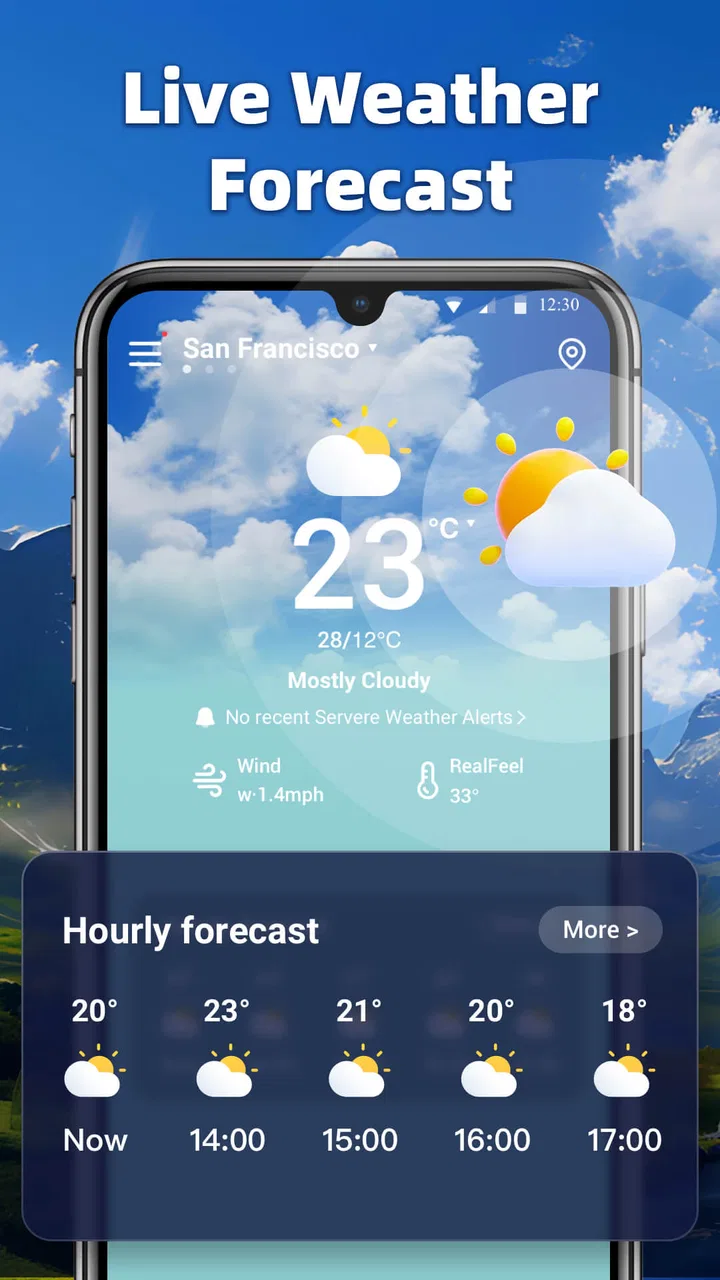
Weather Watch-Live Forecast provides real-time weather updates, detailed 7-day forecasts, and severe weather alerts. It also includes features like radar maps, air quality indexes, and customizable widgets for quick access. Users can personalize their experience with themes and notifications tailored to specific weather conditions.
02Is Weather Watch-Live Forecast free to use?
Weather Watch-Live Forecast is available as a free download with basic features. However, it offers a premium subscription that unlocks advanced features such as ad-free browsing, enhanced radar capabilities, and extended forecast details. Users can choose the plan that best suits their needs.
03How accurate are the forecasts provided by Weather Watch-Live Forecast?
The app utilizes data from multiple reliable meteorological sources for its forecasts, ensuring high accuracy. It updates frequently to provide the most current information. However, as with any weather prediction tool, occasional discrepancies can occur due to rapidly changing weather conditions.
04Does Weather Watch-Live Forecast support international locations?
Yes, Weather Watch-Live Forecast supports weather data for locations worldwide. Users can search for and save multiple locations to get weather updates for their specific areas of interest, making it a versatile tool for travelers and those with international connections.
05Can I customize notifications in Weather Watch-Live Forecast?
Yes, the app allows users to customize notifications for various weather events. You can set alerts for severe weather conditions, daily forecasts, and even specific weather parameters like temperature changes. This ensures you receive timely information relevant to your preferences.
Pros
- Real-time updates keep you informed instantly.
- Intuitive interface simplifies navigation.
- Customizable alerts for severe weather.
- Detailed hourly forecasts available.
- Incorporates radar and satellite imagery.
Cons
- Occasional ads can be intrusive.
- Requires internet for full functionality.
- Some features need premium subscription.
- Battery drain with constant location tracking.
- Limited widget customization options.

Weather Watch-Live Forecast
Gallery